
Asynchronous Data in React Applications
When I first started out, the greatest enigma to me was the term "APIs". "What the heck are APIs?!?!" I always thought to myself. Now, with a bit more understanding, I'll try my best to explain to you what an API is.
Application Programming Interface (APIs) essentially are the liaison between programming interfaces. It allows for the communication of data between applications. Let's use weather app for example. A weather app may display to you the temperatures of different cities, however, it's not the website that just hosts this massive amount of data. Instead, the weather app requests for weather data of different cities via APIs. Once the data is "fetched", the weather app has code that renders the information that's relevant to us on the UI so it's easy for you as the user to view.
Now that you have a general idea of what APIs mean and how websites fetch their data, let's look at the basics of the code that enables this communication to occur.
Fetching and Manipulating Data in React
Remember earlier how we talked about asynchronous data? Well, we're not revisiting that topic. Here, we will discuss two functions that allow us to:
- Fetch the data from the API
- Store the fetched data into a variable
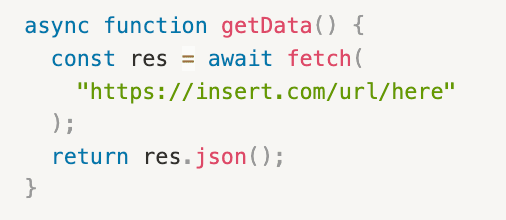
Fetching Data
We use the following function to fetch data from a url (eg API key).
Manipulating Fetched Data
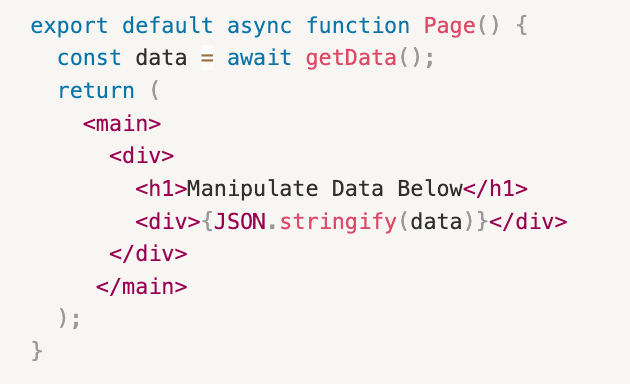
Since the getData() function returns the JSON data, we can store the returned result into a variable like below:
Passing Data as Props
Yay! Now we can manipulate the returned JSON data. But the issue now is that we just have a giant array of JSON objects, which is usually not what we want to render on our website. We want our clients to see simple pretty text, not cluttered data. In order to extract only the properties that we are interested in, we can do what's called "passing data as props". Essentially, breaking down the object into its properties, and extracting those properties and injecting them into JSX so render on the page. Let's see how we can do that below:
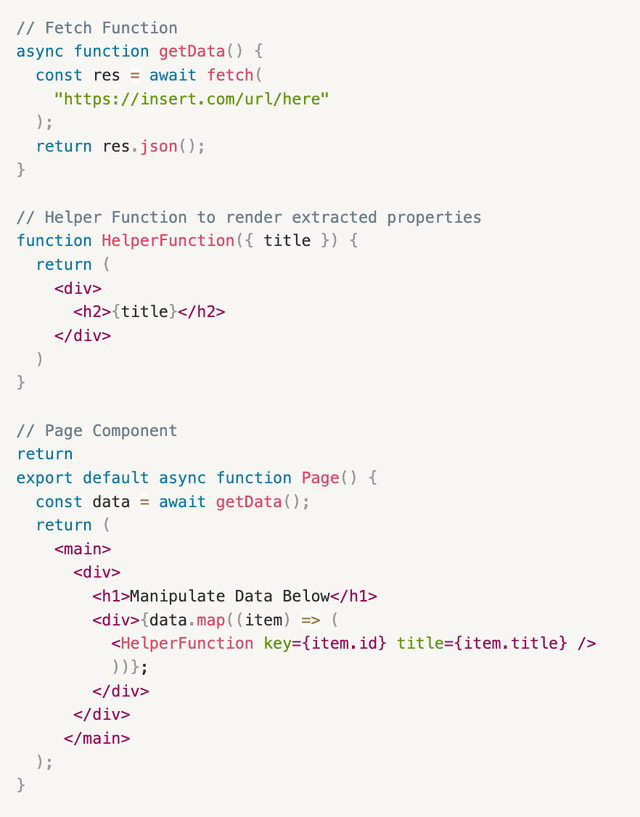
So what the heck is going on? Well, let's dissect it together, shall we?
getData()is the function that fetches the data from the API.Page()is the React Component on the page where you are trying to load the data into. You must change this component into anasync functionso that we can useawaitas on the left.const data = await getData()is saying, "Wait for the data to be fetched. When it returns, store it in this variable data"
- Once the data is loaded into the variable, we can manipulate the returned data. Usually, the data will be returned as an array of JSON objects. And usually, we only need to use some properties of the JSON object. To extract the desired properties, we must pass data as props. Here, we are applying the
map()function to generate a new array from the initialdata(fetched array of JSON objects). The function you apply is up to you. In this example, we are employing a helper function calledHelperFunction(...)to extract the title of each of the items in the initial array as an HTML element. In simple speak, we take each element fromdataand render their title. Refer to this official document for more information about passing data as props: Passing Props in React