
JavaScript Notes
This is a quick cheat sheet for learning JavaScript syntax. I strongly recommend following a course to understand the details of JavaScript as a strong foundational understanding of the syntax is necessary to understand other web development tools like TypeScript, Node.js, React, etc.
Here's the link to the official web documents for JavaScript:
JavaScript MDN Web DocsData Types
I'm going to assume you are already aware of the different data types. Here are some examples of JavaScript data types below:
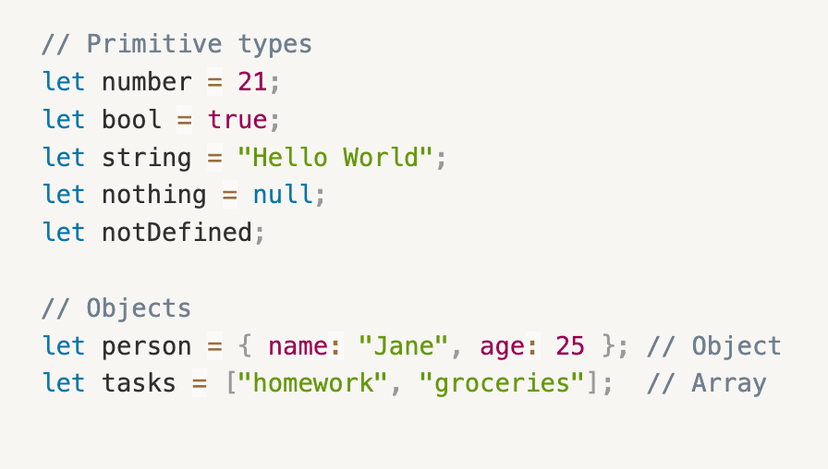
Data Types
JavaScript is considered a weakly typed language, which means unlike languages like Java, you do not have to declare which data type goes into the variable. Instead, JavaScript will identify the data type for you!
let, const, var
However, there are different ways you can initialize a variable in JavaScript:let, const, and var. Let's study these:
Stricter Typing in JavaScript
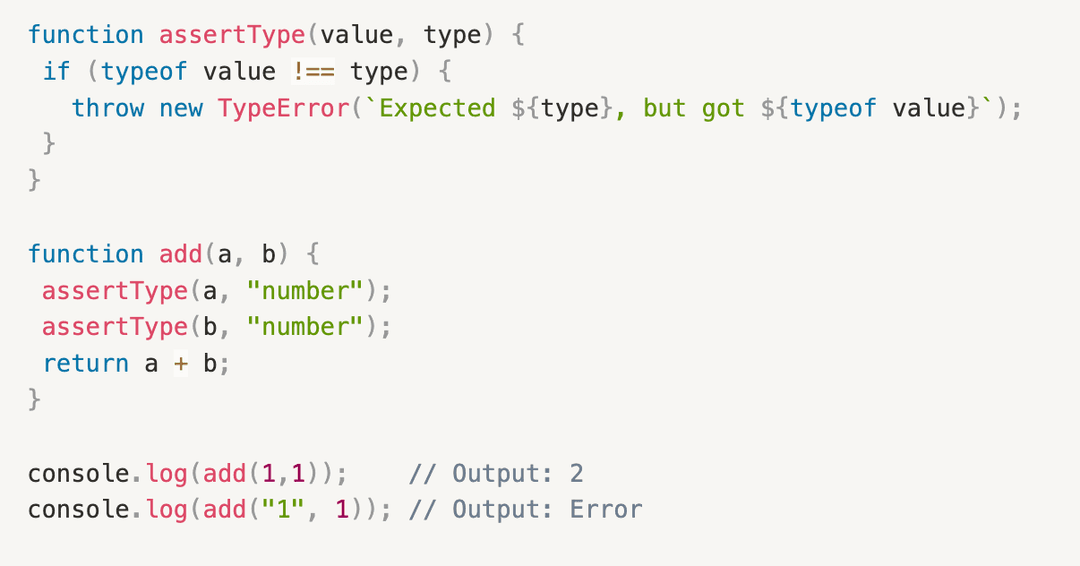
Remember how I said JavaScript is a weakly typed language? Well, as you can imagine, this can cause issues. For instance, since there's no typing, this can cause arguments of incorrect data types to pass through when they shouldn't have. Observe the following example:
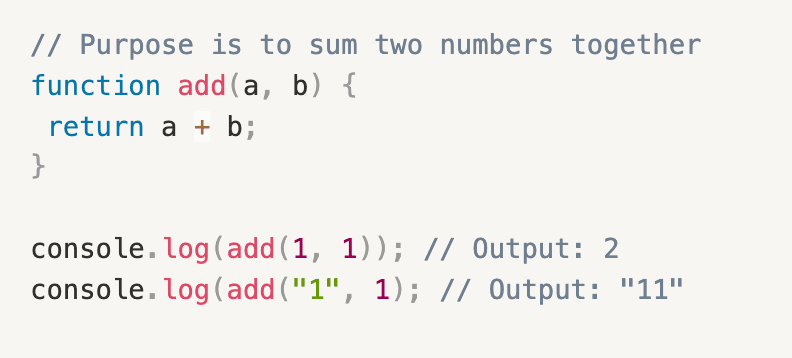
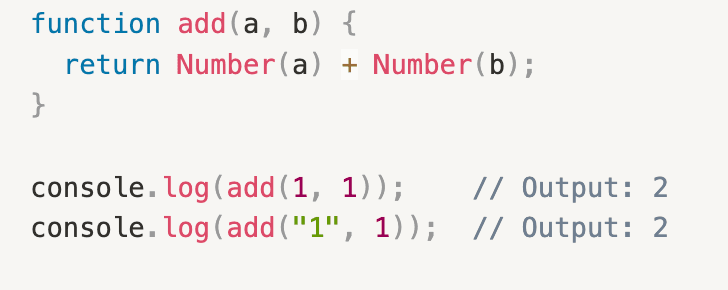
In this example, the purpose of the add()function is to sum together two numbers. However, since we don't have any strict typing pre-requisites for the parameters provided to the add() function, inappropriate parameters, like strings (eg "1") are allowed to pass through. This leads to unexpected behaviour like returning a string output instead of a numerical output, as we see in the example with add("1", 1).
So, how do we address this? Well we have a few options:
- Use TypeScript (static typing)
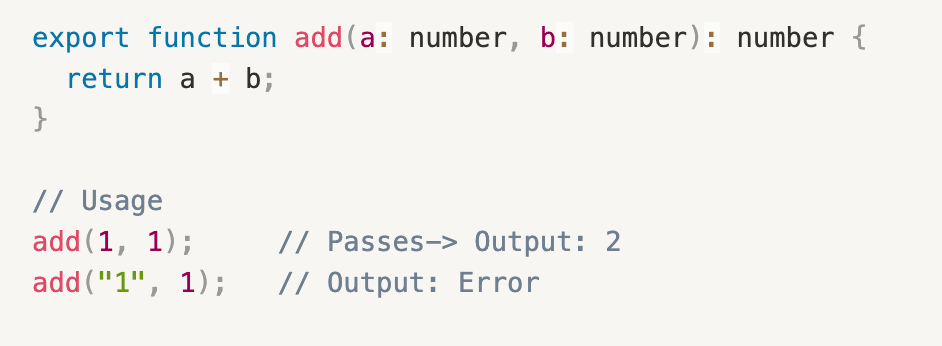
- Manually type verification
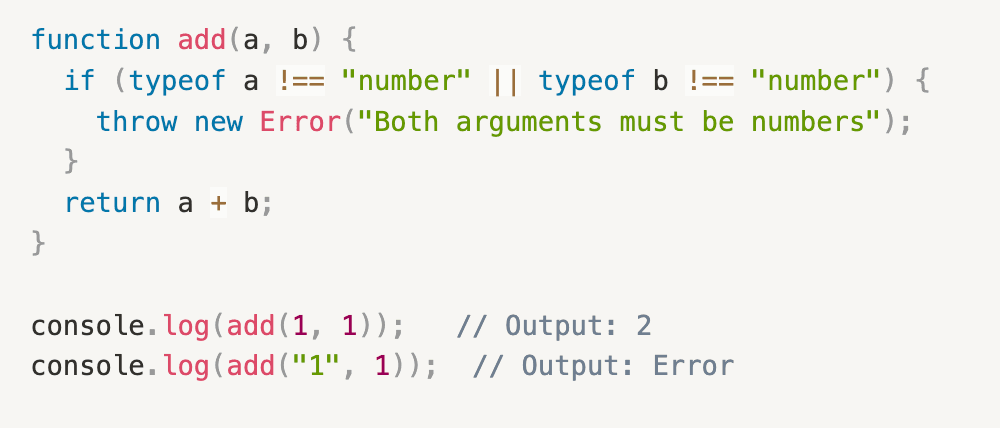
- Create an assert function
- Type coercion
Arithmetic
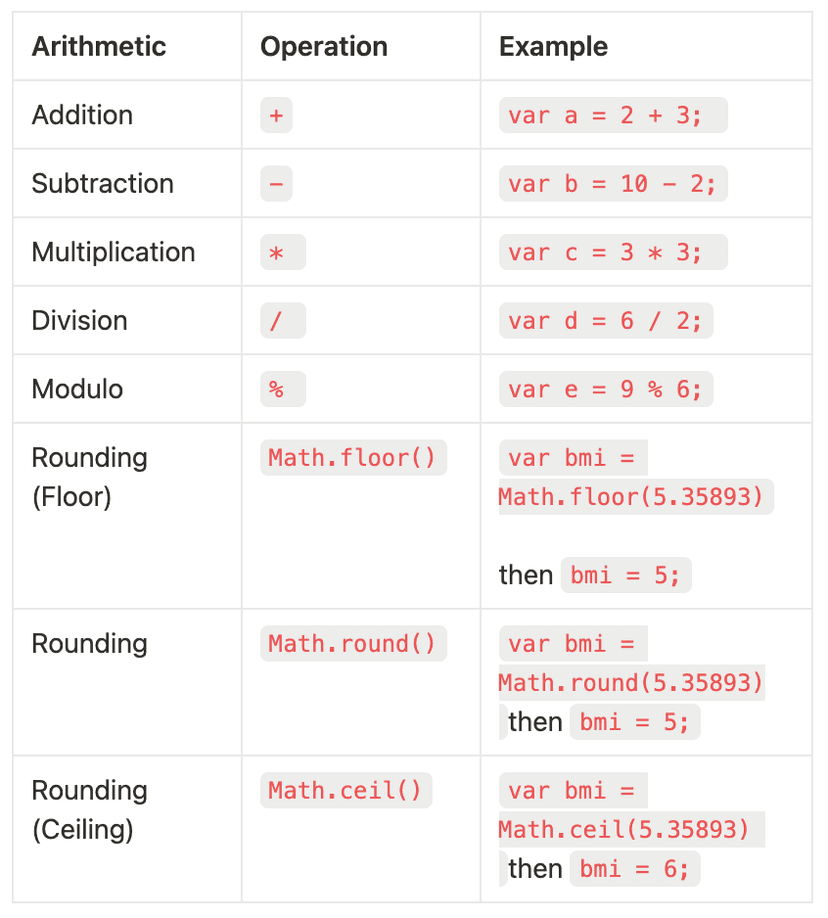
Below is a useful table to remember some common arithmetic symbols in JavaScript:
Assignment, Comparison, and Logical Operations
Assignment, comparison, and logical oeprational syntax in JavaScript is similar to other programming languages, however there are a few differences that I have highlighted in orange below:
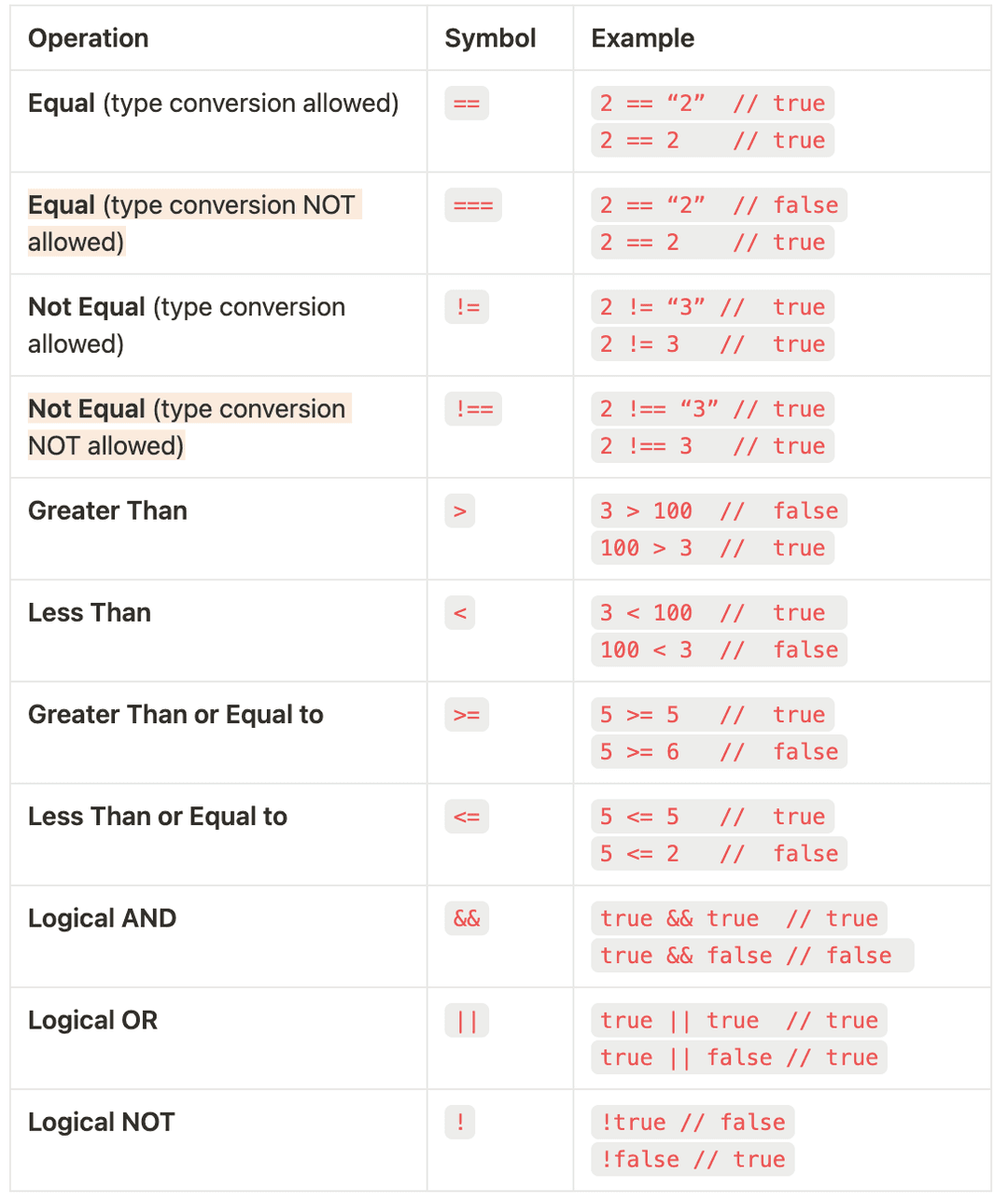
NOTE: In JavaScript, == and === mean different comparisons. == employs type conversion to assess whether or not these values are equivalent. For instance, 2 == "2" gets translated to 2 == 2, which evaluates to true. Whereas === is type sensitive, so 2 == "2" would evaluate to false since numbers and strings are not equivalent.
Functions
Now functions are what give JavaScript the chance to be powerful. Before we get into it, you may have heard the terms function and methods be used interchangeably.Functions can exist on their own, whereas methods are functions that sit inside objects. Methods act on the object they belong to.
Now, let's start off by going over the few ways functions can be created in JavaScript.
1) Function Declaration
Function declarations hoist functions to the global scope. This means that this function will be accessible everywhere else in the script. It is also order dependent, so if you want function second() to use function first(), then you must declarefunction first() first.
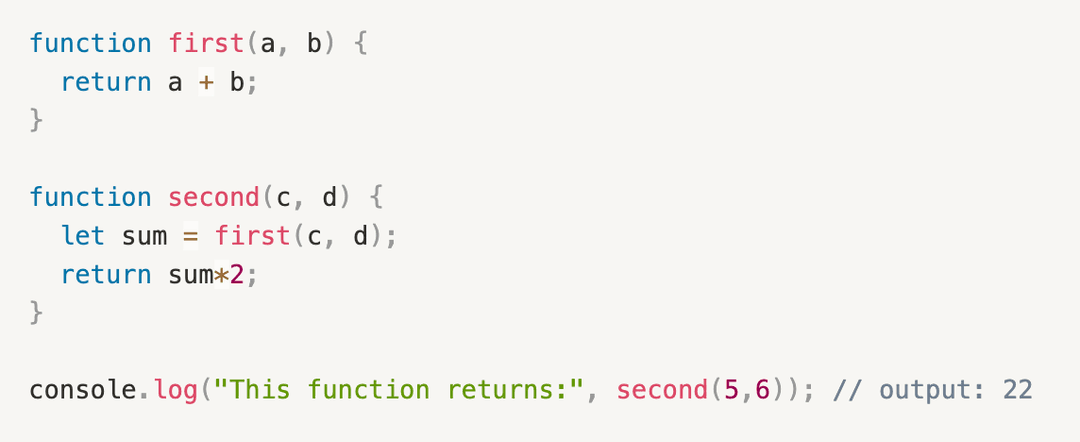
In this example, we see two functions, both which are intiialized via function declaration. Thus, they are available at the global scope. If function second() was declared first, then this code would return error since the body of function second() relies on function first()(ie order dependent).
2) Function Expression
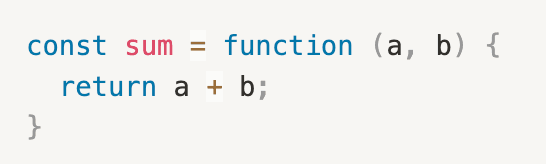
In simple terms, we are placing a no-name function into a variable. Best practice is to place the function expression inside aconst declared variable. The reason for this is to prevent accidental reassignment (ie we don't want to accidentally overwrite the variable to which this function is assigned to, because doing so would mean losing access to this function). See below for an example:
3) Immediately Invoked Function Expression (IIFE)
IIFEs are used when you want a function that is executed immediately after it is defined. See below for an example:
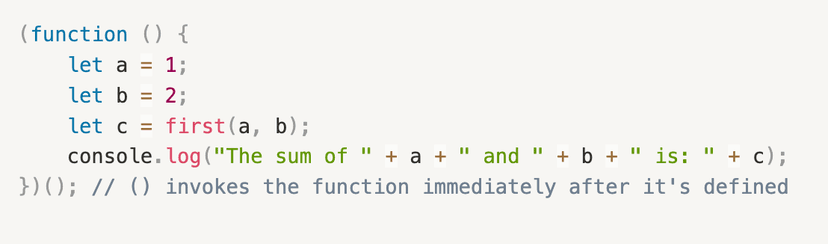
NOTE: Remember, the (); that follows the IIFE is what invokes the IIFE so it can run as soon as it has been defined.
Arrow Functions
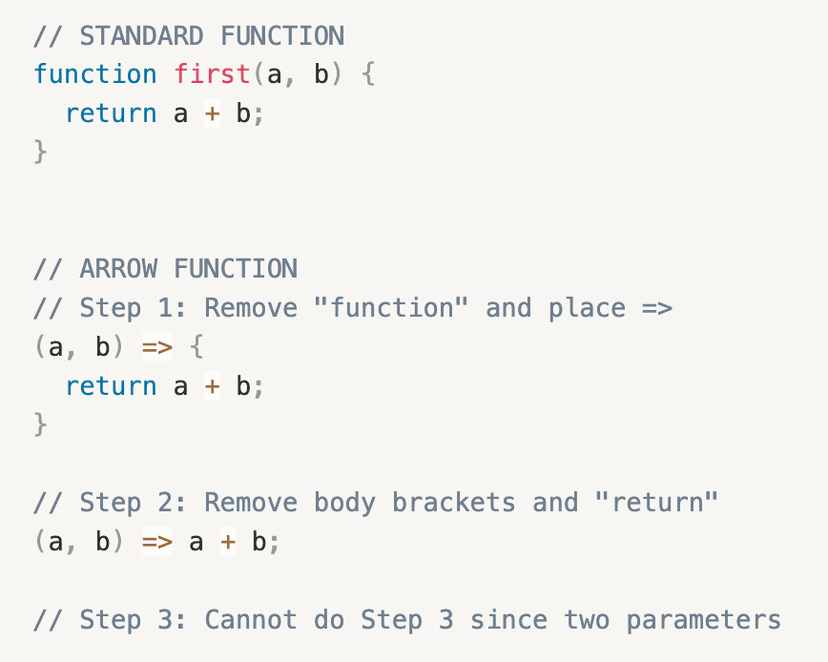
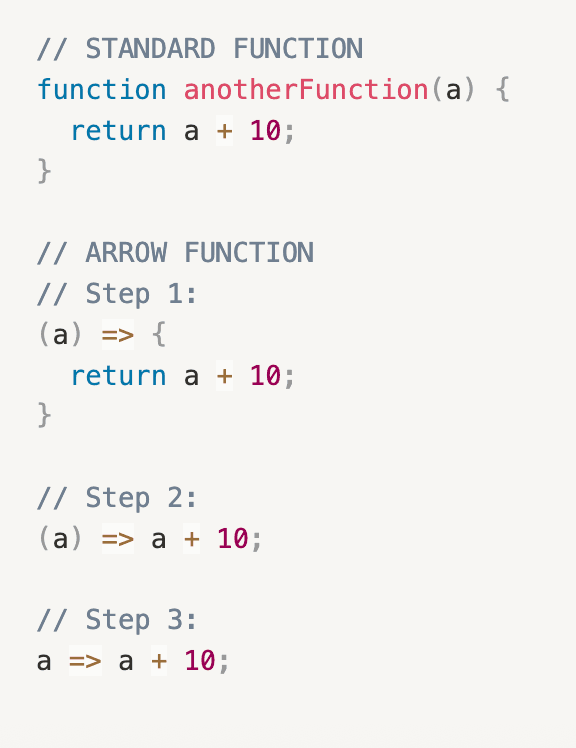
Now let's look at arrow functions. Here's how to transform a standard function into an arrow function:
- Remove word
function; replace with arrow between argument and open body bracket(. - Remove body brackets and word
returnas it is implied. - Remove argument parentheses (only if function has one parameter). Otherwise, leave the parentheses.
Two Parameters Function into Arrow Function
One Parameter Function into Arrow Function
Arrow Functions vs Function Declarations
Now that we learned the different ways that we can define functions in JavaScript, you may be wondering, "So can I just use them interchangeably whenever I feel like it?" The answer is NO.
Arrow functions cannot be used as methods in JavaScript as they do not have their ownthis. If used within a method, thiswill not refer to the object this method belongs to; instead, it will refer to the object in the outer scope. Therefore, arrow functions break when used within methods. Due to this unpredictable behaviour, arrow methods are NOT used within methods in JavaScript.
Here's more information on arrow functions:
Arrow Function ExpressionsArrays
Arrays is an important topic to understand in JavaScript, since you will most likely always be dealing with arrays of data (eg JSON, strings, numbers, etc).
Here is a useful link for more information (which I highly recommend looking at):
JavaScript ArraysEvents
Coming soon...