
JSX Notes
JSX is an extension of JavaScript syntax that looks like HTML inside JavaScript. It definitely is NOT required; but it certainly makes it a lot easier to read JavaScript. One important note to understand is that browsers do not understand JSX directly. Instead, we need frameworks like Next.js to translate JSX into JavaScript.
Below are some ways that JavaScript and JSX look different. We will compare React without JSX vs React with JSX to illustrate how efficient JSX is.
Attributes and Props
Before we start, it's important to understand React.createElement(type, props, children). The parameters for this React.createElement()is:
- type: the DOM tags we are creating (eg "div", "button", etc)
- props: attributes and event handlers (eg className, id, onClick, etc)
- children: element's children (eg strings, numbers, etc)
Now we've acquainted ourselves with this function, let's look into the differences between React + JavaScript vs React + JSX:
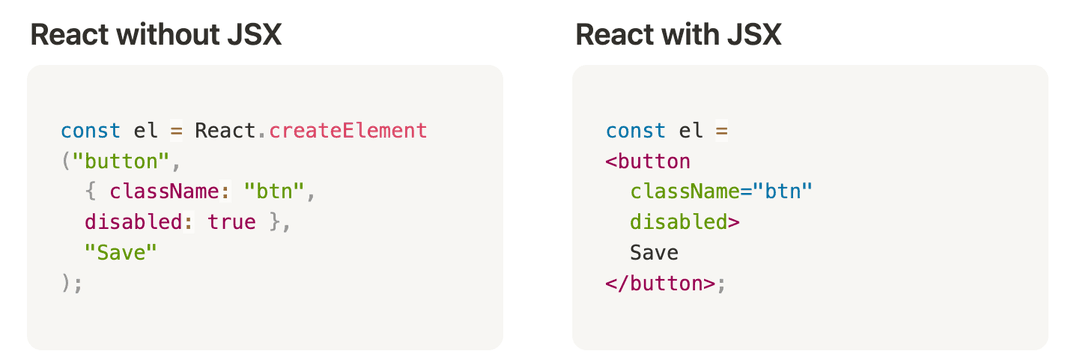
Notice how in the "React without JSX" example, we have an example where we have to use the React.createElement()function, which starts to get clunky. Whereas with the "React with JSX" example, it's much easier to write and read. The general structure is:
<tag> + attributes/event handlers + text + </tag>
Dynamic Values
A powerful feature of JSX is that we can solely re-load dynamic information while keeping the static information the same, which makes renderig efficient.
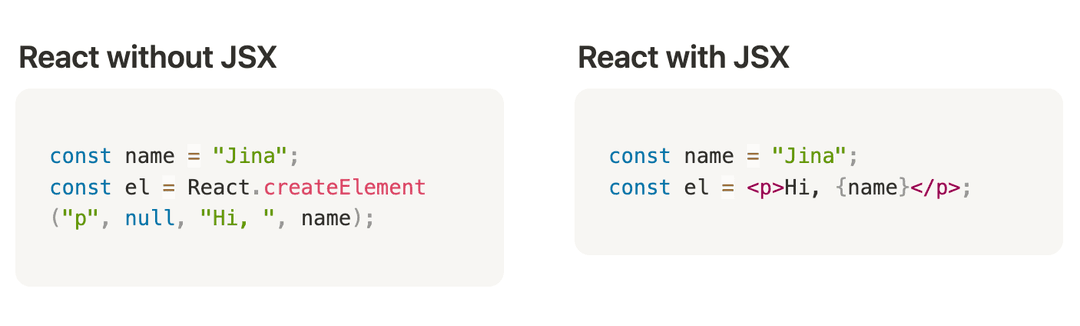
You're probably starting to get the idea that JSX definitely makes it easier to read code. Here's more information if you're interested: Introducing JSX